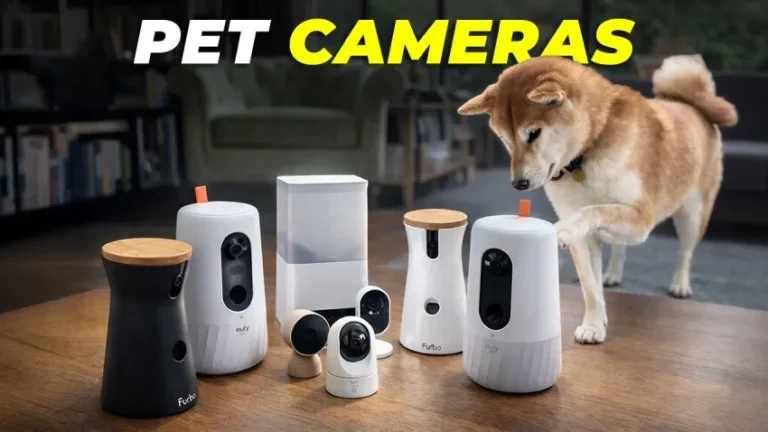
Leaving a pet at home can make even a normal workday feel emotionally complicated. You wonder whether your dog is barking, whether your cat actually ate, whether the scratching sound was mischief or nothing at all, and whether your pet is relaxed or quietly stressed.
That is why the best pet cameras are more than simple indoor cameras. The right one helps you check in calmly, talk to your pet, toss a treat, monitor feeding, or simply confirm that everyone is safe before you get back to your day.
The best choice depends on how you live with your pet. Some homes need a treat-tossing camera. Others need a wide pan-and-tilt view of the living room. Multi-pet homes may need a feeder camera. Privacy-conscious buyers may prefer a camera with a physical privacy feature. Below are 10 Amazon-available pet camera options from 10 unique brands, chosen for practical home use, feature relevance, and everyday convenience.
Quick Product List
- Furbo 360° Dog Camera
Best For: Dog owners who want treat tossing, two-way audio, and rotating room coverage. - Petcube Bites 2 Lite
Best For: Pet parents who want a treat dispenser with a simpler, compact monitoring setup. - eufy Security 4K Indoor Camera E30
Best For: Shoppers who want a high-resolution pan-and-tilt pet camera without relying on a treat dispenser. - WYZE Cam Pan v4
Best For: Value-focused buyers who want 4K video, pan/tilt coverage, and pet/person motion tracking. - Tapo TP-Link C210 2K Pan Tilt Security Camera
Best For: Budget-friendly pet monitoring with 2K video, two-way audio, and local storage support. - Arlo Essential Indoor Pan Tilt Security Camera 2K
Best For: Pet owners who want pan/tilt coverage, privacy controls, and smart alert options. - Ring Indoor Cam
Best For: Homes already using Ring or Alexa devices. - PETLIBRO Automatic Cat Feeder with Camera
Best For: Cat and small-dog households that want feeding plus camera monitoring in one device. - Kasa EC70 Indoor Pan/Tilt Camera
Best For: Simple, affordable baby-and-pet monitoring with pan/tilt viewing. - TKENPRO 2K Pet Camera Treat Dispenser
Best For: Shoppers who want a treat-tossing pet camera with 2K video and dual-band Wi-Fi.
Things to Consider Before Buying a Pet Camera
1. Decide whether you need interaction or observation
Some pet cameras are mainly for watching. Others let you talk, toss treats, or control a feeder. If your pet mostly sleeps while you are away, a simple pan-and-tilt camera may be enough. If your dog responds well to rewards, a treat-tossing model can make check-ins feel more engaging.
2. Look closely at field of view and pan/tilt movement
A fixed camera can miss a pet who moves from the couch to the doorway. Pan-and-tilt cameras are better for open rooms, long hallways, and pets that wander. A wide lens helps too, but motorized movement is especially useful if your pet has several favorite lounging spots.
3. Video quality matters, but placement matters more
1080p is often enough for casual pet checks. 2K and 4K cameras can make it easier to see small details, such as whether a pet is chewing something or whether the food bowl is empty. Still, a well-placed 1080p camera usually beats a poorly placed 4K camera.
4. Think about night monitoring
If you leave pets at night, work late, or travel, night vision is important. Infrared night vision is common, while some models add color night vision or a spotlight. For pets, avoid placing bright spotlights directly where they sleep.
5. Check storage and subscription expectations
Some cameras offer local storage through a microSD card. Others lean heavily on cloud subscriptions for recorded clips, advanced alerts, or video history. If you only need live view, you may not need a paid plan. If you want event history, smart alerts, or saved clips, check the subscription terms before buying.
6. Consider privacy
Indoor cameras point into personal spaces. Look for app controls, privacy modes, physical covers, or clear ways to turn off the camera when you are home. If the camera is going in a bedroom, nursery, or shared living space, privacy features matter.
7. Match the camera to your pet’s behavior
A treat camera is fun for many dogs, but not every pet needs one. Food-motivated pets may love it. Pets with strict diets may be better served by a standard camera. Cats may benefit more from a feeder camera or a wide pan/tilt camera than from a treat-tossing model.
8. Confirm Wi-Fi compatibility
Many pet cameras need 2.4GHz Wi-Fi, while some newer models also support 5GHz. If your router uses combined network names, setup can sometimes take a little patience. Place the camera where the Wi-Fi signal is steady, especially if you plan to stream often.
Individual Product Reviews
1. Furbo 360° Dog Camera
Product: 1
Best Features
The Furbo 360° Dog Camera is built around the classic pet-camera experience: see your dog, talk to your dog, and toss a treat remotely. Its Amazon listing highlights 1080p live view, 360-degree rotating coverage, 4x zoom, two-way audio, color night vision, barking alerts, and app-controlled treat tossing. 1
In daily use, this is the kind of camera that feels most “pet specific.” The treat-tossing feature gives your check-in a purpose beyond just watching. For a dog who knows the sound of the dispenser, the camera can become a familiar little ritual: voice, treat, reassurance, then back to resting.
The rotating view is useful in living rooms where dogs move between a bed, sofa, and doorway. Instead of staring at one empty corner, you can sweep the room and find your pet more naturally.
Potential Consumer
Best for dog owners who want a dedicated pet camera rather than a general security camera. It makes the most sense for food-motivated dogs, people who want remote treat interaction, and households where barking alerts are useful.
Pros
- Purpose-built for dogs
- Treat tossing adds real interaction
- 360-degree rotating view helps reduce blind spots
- Two-way audio for reassurance
- Color night vision listed on Amazon
- Standard see, talk, and toss features are listed as available without a required subscription
Cons
- More expensive than basic indoor cameras
- Treat compatibility and portion control still require attention
- Not ideal for pets on strict diets
- Some advanced features may involve optional service plans
Where to Buy
Check current availability for the 1.
2. Petcube Bites 2 Lite
Product: 2
Best Features
The Petcube Bites 2 Lite combines a pet camera with a treat dispenser. Its Amazon listing includes 1080p live streaming, a 110-degree wide-angle view, 30-foot night vision, 8x digital zoom, two-way audio, app-based treat tossing, and motion/sound alerts with optional Petcube Care features. 2
In a smaller apartment or single-room pet zone, this camera feels practical. The 110-degree view is not as sweeping as a full pan-and-tilt camera, but it works well when aimed at a crate, bed, food area, or favorite corner of the room.
The treat container is especially useful for pets who respond to routine. You can use a quick voice cue, toss a treat, and give your pet a little positive moment during the day.
Potential Consumer
Best for pet parents who want treat tossing but do not necessarily need a rotating camera. It fits cats and dogs better when the camera is placed intentionally in one high-traffic pet area.
Pros
- Treat dispenser built in
- 1080p video listed on Amazon
- Two-way audio
- Night vision
- Motion and sound alerts
- Works with Alexa according to the listing
Cons
- Fixed viewing angle compared with pan/tilt models
- Optional subscription may be needed for some advanced alerts/history
- Treat dispensing is not ideal for pets with restricted diets
- Placement matters more because it does not rotate like some competitors
Where to Buy
View the 2.
3. eufy Security 4K Indoor Camera E30
Product: 3
Best Features
The eufy Security 4K Indoor Camera E30 is listed as a 4K indoor camera that works as a pet camera, nanny/baby monitor, and home security camera. Amazon lists 360° pan-and-tilt, AI auto tracking, AI detection, 24/7 recording, color night vision, two-way audio, and HomeKit compatibility. 3
This is a strong choice if you care more about visibility than treats. The 4K resolution is helpful when you want to see small details: whether a dog is holding a sock, whether a cat is on the counter, or whether a pet bowl has been disturbed.
The pan-and-tilt format also makes it feel more flexible than a fixed camera. It is better suited to a room where pets move around rather than one exact feeding or crate spot.
Potential Consumer
Best for tech-forward households that want a high-resolution indoor camera for pets, kids, and general home monitoring. It is especially appealing if you do not need treat tossing.
Pros
- 4K video listed on Amazon
- 360° pan-and-tilt design
- AI pet/person tracking listed
- Two-way audio
- Color night vision
- Useful for pets, baby monitoring, and indoor security
Cons
- No treat dispenser
- More camera-focused than pet-entertainment-focused
- Advanced setup and storage preferences may require app familiarity
- May be more than needed for simple live-view checks
Where to Buy
See the 3.
4. WYZE Cam Pan v4
Product: 4
Best Features
The WYZE Cam Pan v4 is listed as a 4K smart security camera for home, baby, and pet monitoring. Amazon highlights 360° pan, 180° tilt, 8x digital zoom, AI-powered motion tracking for pets and people, color night vision, dual-band Wi-Fi 6, two-way audio, local microSD support up to 512GB, and Alexa/Google Assistant compatibility. 4
For the price-conscious buyer who still wants sharp video and movement tracking, this is one of the more feature-dense choices. It is not a pet-specific treat camera, but it makes a lot of sense for watching a room where pets roam.
The physical shape is compact enough for shelves, counters, or mounted placement. Because it can pan and tilt, you can follow your pet across a room instead of hoping they stay in frame.
Potential Consumer
Best for shoppers who want strong camera features at a practical price and do not need food interaction. It suits dogs, cats, and multi-use rooms.
Pros
- 4K video listed
- 360° pan and 180° tilt
- AI tracking for pets and people
- Dual-band Wi-Fi 6 support
- Two-way audio
- Local storage support listed
Cons
- No treat dispenser
- More security-camera feel than pet-camera feel
- Cloud features may depend on Wyze service options
- Best results require good placement and Wi-Fi strength
Where to Buy
Shop the 4.
5. Tapo TP-Link C210 2K Pan Tilt Security Camera
Product: 5
Best Features
The Tapo C210 is listed as a 2K pan-and-tilt indoor camera for baby monitoring, dog monitoring, motion detection, two-way audio, night vision, cloud storage, and microSD card storage. Amazon lists 360° horizontal and 114° vertical range, 2K video, motion/person/baby crying detection, two-way audio with built-in siren, and night vision up to 30 feet. 5
This is the kind of camera that feels easy to justify for everyday pet monitoring. It is not fancy in a pet-specific way, but it covers the basics very well: see the room, talk through the app, and check what happened after a motion alert.
It is especially practical for kitchens, living rooms, and home offices where pets spend most of the day. The local microSD option is useful if you prefer not to depend entirely on cloud recording.
Potential Consumer
Best for budget-conscious pet owners who want a dependable indoor camera with pan/tilt coverage and two-way talk.
Pros
- 2K video listed
- 360° horizontal pan coverage
- Two-way audio
- Night vision listed
- Local microSD storage support
- Works with Alexa and Google Assistant according to the listing
Cons
- No treat tossing
- Indoor-focused
- Advanced cloud features may require Tapo Care
- Less pet-specific than Furbo or Petcube
Where to Buy
View the 5.
6. Arlo Essential Indoor Pan Tilt Security Camera 2K
Product: 6
Best Features
The Arlo Essential Indoor Pan Tilt Security Camera 2K is listed for pet monitoring with 2K video, 360° pan, 180° tilt, automatic motion tracking, two-way audio, night vision, barking detection, smart detection, and a 1-month Secure Plan trial. The listing also emphasizes privacy controls that let the camera lens flip down and out of view when not needed. 11
This camera feels well matched to people who want pet visibility but also care about privacy. That is important for an indoor camera, especially in a living room, nursery, bedroom, or shared apartment.
The automatic motion tracking and pan/tilt movement are useful for pets who wander. Instead of checking a static frame, you get a more complete view of where your pet went and what they are doing.
Potential Consumer
Best for pet owners who want a polished indoor camera with privacy-minded features and smart-home compatibility.
Pros
- 2K video listed
- 360° pan and 180° tilt
- Automatic motion tracking
- Barking detection listed
- Two-way audio
- Privacy-oriented lens control
Cons
- No treat dispenser
- Some smart features may require a paid plan after trial
- More expensive than basic budget cameras
- Pet-focused alerts may need fine-tuning
Where to Buy
Check the 6.
7. Ring Indoor Cam
Product: 7
Best Features
The Ring Indoor Cam is listed with 1080p HD video, Live View, color night vision, motion alerts, a manual privacy cover that turns off the camera and microphone, plug-in power, and Alexa compatibility. 7
For people already using Ring doorbells, Ring alarms, or Echo Show devices, this camera fits naturally into the same ecosystem. It is not designed specifically as a pet camera, but it works well for basic indoor pet checks.
The privacy cover is the standout physical detail. There is something reassuring about being able to manually block the camera and mic when you do not want the room monitored.
Potential Consumer
Best for Ring households, Alexa users, and people who want a compact indoor camera that can double as a pet monitor.
Pros
- 1080p HD video listed
- Color night vision
- Motion alerts
- Manual privacy cover
- Plug-in design
- Works with Alexa
Cons
- No pan/tilt movement
- No treat or feeder features
- Best experience may involve Ring subscription features
- Less flexible for large rooms unless placed carefully
Where to Buy
See the 7.
8. PETLIBRO Automatic Cat Feeder with Camera
Product: 8
Best Features
The PETLIBRO Automatic Cat Feeder with Camera is listed with 1080p HD video, night vision, 5G Wi-Fi, two-way audio, low-food and blockage sensing, and motion/sound alerts for cats and dogs. 8
This is not just a camera; it is a feeding station with visibility. That changes the experience. Instead of wondering whether your cat came to eat, you can check the feeding area directly and use the camera to observe mealtime behavior.
For cats, this can be more useful than a treat camera. Cats often care less about remote interaction and more about routine. A feeder camera lets you monitor the moment that matters most: whether food was dispensed and whether the right pet showed up.
Potential Consumer
Best for cat owners, small-dog owners, and multi-hour workday households where feeding reliability matters as much as video monitoring.
Pros
- Combines automatic feeding and camera monitoring
- 1080p video listed
- Night vision
- Two-way audio
- Low-food and blockage alerts listed
- Motion and sound alerts listed
Cons
- Less useful if you do not need an automatic feeder
- Camera angle is focused around the feeding area
- Not a room-wide pan/tilt pet camera
- Not suitable for wet food unless specifically supported by the feeder design
Where to Buy
Shop the 8.
9. Kasa EC70 Indoor Pan/Tilt Camera
Product: 9
Best Features
The Kasa EC70 is listed as a 1080p indoor pan/tilt wired security camera that works as a baby and pet monitor. Its Amazon listing includes motion detection and tracking, two-way audio, night vision, subscription-free local storage, and optional cloud storage. 9
This camera is a sensible “just let me see the pet” option. It does not try to be a treat machine or a feeder. Instead, it gives you a movable indoor view, which is often enough for renters, apartment dwellers, and people who want a low-fuss setup.
The pan/tilt design is helpful if your pet has multiple favorite spots. You can check the dog bed, sweep to the sofa, then look toward the door without installing multiple cameras.
Potential Consumer
Best for shoppers who want an affordable indoor pet monitor with simple app viewing and no pet-specific extras.
Pros
- 1080p video listed
- Pan/tilt design
- Motion detection and tracking
- Two-way audio
- Night vision
- Local storage option listed
Cons
- No treat dispenser
- No feeder function
- Less advanced than newer 2K/4K cameras
- Indoor wired placement only
Where to Buy
View the 9.
10. TKENPRO 2K Pet Camera Treat Dispenser
Product: 10
Best Features
The TKENPRO 2K Pet Camera Treat Dispenser is listed with 2K video, a 360° view, phone app control, 5GHz and 2.4GHz Wi-Fi, two-way talk, remote treat tossing, motion alerts, and auto tracking. 12
This model is interesting because it blends higher-resolution monitoring with treat interaction. For households where a basic treat camera feels too limited, the 2K and 360° features make it more flexible.
The everyday appeal is straightforward: you can find your pet, speak to them, and send a treat without needing a separate camera and dispenser. It is especially useful for owners who want interaction but are comparing alternatives to the bigger-name pet-camera brands.
Potential Consumer
Best for pet parents who want treat tossing plus a rotating view and dual-band Wi-Fi support.
Pros
- 2K video listed
- 360° view
- Remote treat tossing
- Two-way talk
- 5GHz and 2.4GHz Wi-Fi listed
- Motion alerts and auto tracking listed
Cons
- Less established brand than Furbo, Petcube, Ring, or eufy
- Treat dispensing requires compatible dry treats
- App experience may matter more than hardware specs
- May be overkill if you only need live viewing
Where to Buy
Check the 10.
Final Verdict
The best pet camera depends on what kind of reassurance you want.
If you want a dedicated dog camera with treat interaction, the 1 is the most pet-specific choice. If you want a slightly simpler treat-dispensing option, the 2 is a practical alternative.
If you mainly want room visibility and strong camera quality, the 3 and 4 stand out for high-resolution monitoring and pan/tilt coverage.
For budget-friendly pet watching, the 5 and 9 are sensible picks. They are not as emotionally engaging as treat cameras, but they solve the core problem: seeing and hearing what is happening at home.
For privacy-conscious smart-home users, the 6 and 7 are especially appealing. And if feeding is your main concern, the 8 is the most practical camera-feeder hybrid.
In short: choose a treat camera if interaction matters, a pan/tilt camera if visibility matters, and a feeder camera if meal monitoring matters most.